Calm Match 3 Puzzle
Reviews
Description
Game Introduction
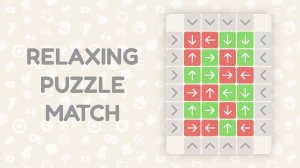
Calm Match 3 Puzzle is a visually pleasing tile-matching game that combines classic mechanics with a serene atmosphere. The core objective is to clear the puzzle field by forming groups of three or more identical moving tiles horizontally or vertically. As you progress through numerous levels, the complexity gradually increases, providing a satisfying mental challenge without overwhelming stress. The bright graphics and soothing background music are designed to create a calming experience, making it an ideal choice for players seeking a relaxing break from daily routines.
How to Play
To play Calm Match 3 Puzzle, simply tap or click on a tile to move it and create a match of three or more identical tiles in a row or column. When you form a match, those tiles disappear from the grid. Special block tiles appear on many levels; to collect them, you must destroy a group of moving tiles that is directly adjacent. If you get stuck, use the Undo booster to cancel your last move or the Color Change booster to alter the color of a new tile, helping you create better matches. The game is intuitive and easy to learn, making it accessible for players of all ages.
Game Features
The game features vibrant and colorful graphics that are easy on the eyes. It includes soothing background music and sound effects that enhance relaxation. Multiple levels with increasing difficulty keep the gameplay engaging. Helpful boosters like Undo and Color Change provide assistance when needed. The simple and intuitive match 3 gameplay ensures a smooth experience.
Tips for Success
To succeed in Calm Match 3 Puzzle, focus on planning your moves ahead to create larger matches. Use boosters like Undo and Color Change strategically when you are stuck. Pay attention to special block tiles and clear them as soon as possible to progress. Practice regularly to improve your pattern recognition and speed. Stay calm and enjoy the relaxing atmosphere, as a relaxed mind often makes better decisions.
Compatibility
Faq
Related Titles
Colorful Assort Puzzle Game
A vibrant and relaxing puzzle game that sharpens your mind with fun sorting challenges. Perfect for quick breaks!

Stick Tank Duel - Strategic Artillery Game
Stick Tank Duel offers fun physics-based tank battles with strategic depth and cute stickman graphics.
Bounce Star: Platform Challenge
A fun and challenging platformer with smooth bouncing mechanics and creative obstacles.

Puzzle Pop Quest
Puzzle Pop Quest offers fun, strategic puzzle gameplay with bright graphics and physics challenges. Great for all ages.
Henry Stickmin Puzzle Quest
A charming, funny puzzle game with clever choices and multiple endings. Great for family play.
Color Ball Roll 2048 Puzzle
A colorful and addictive puzzle game that merges rolling fun with strategic challenges. Perfect for all ages!

Slime Lab Puzzle Adventure
A fun, family-friendly puzzle game with unique slime mechanics that challenge coordination and decision-making skills.
Love Reunion Puzzle
A charming and relaxing puzzle game that is fun for all ages.